In each of the lessons, you can click on this top logo to go to the index of lessons
Lesson 8: Chord Substitutions
In the last lesson, I talked about adding simple chords to a melody like our
teaching song - mainly, the I, IV, and V chords. While these sound good, a "three
chord song" can get boring after a while. One of the things you can do to make
it more interesting is to make some "chord substitutions."
.
Now... not every chord is a good substitute for every other chord... but there
are certain groups of chords that work well as substitutions, and that is what
we will look at in this lesson.
.
If you decide you would like to view the "Circle of Fifths" tool for this lesson,
you can come here, to the top of the page, at any time and click this button to
open it - again, it will open in a new tab or window.
.
.
RM209
.
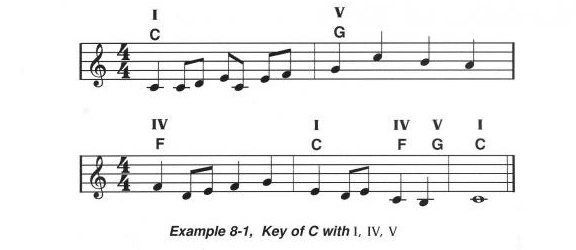
Remember the teaching tune I wrote for this course? In Lesson 8, we're going to
use that tune to start learning about chord substitutions. Here is the song,
with chord names and Roman numerals:
.
.
.
RM210
.
Let's play through the tune, just to make sure we remember it. Even if you're not
ready to play the melody (the right hand part), try to play the chords - we'll
do it in "C" to make it easy! The music is right above.
.
.
RM211
.
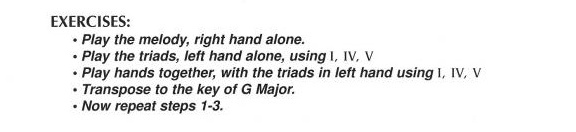
Here is the information about practice exercises that I include in the course book:
.
.
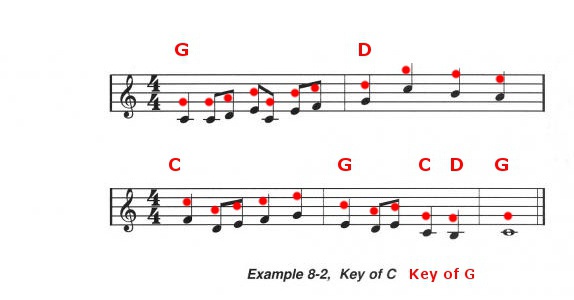
And here is our teaching song in the key of G. The red notes are the melody in the key of G,
and I've written in the chords in G above that.
.
.
.
RM212
.
So now let's put it all together - you play the chords with the left hand, and
I'll play the melody in the key of G. Again, the music is just above.
.
.
RM213
.
Now that you've seen how to take our teaching song and play it in a
different key, let's get back to substitutions.
.
.
.
RM214
.
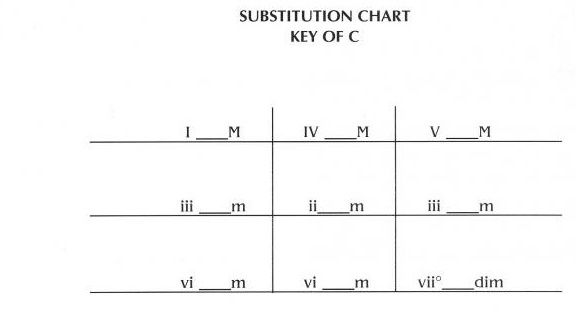
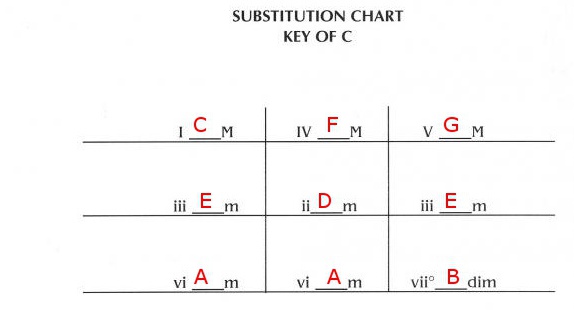
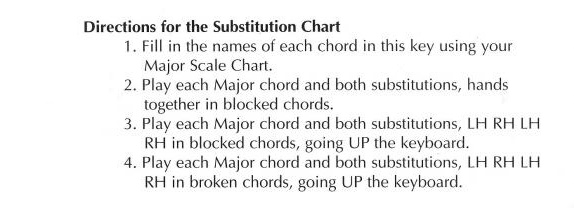
So, let's look at the Substitution Chart, starting out in our teaching key
of "C". Before you start this exercise, you should print out the
Substitution Chart Worksheet
- this contains Substitution Charts for all the keys, and eventually, I'll
want you to go through and fill out the whole set of charts.
.
.
.
RM215
.
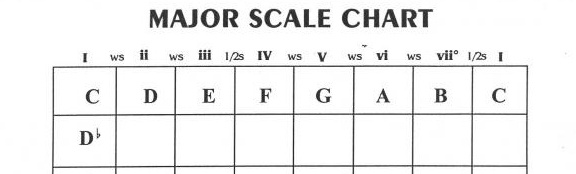
Using the Major Scale Chart that you completed a few lessons back, find the notes
to fill in on the Substitution Chart. I've included a filled-in picture of the
Substitution Chart in the key of C below, below the picture of the first couple
rows of the Major Scale Chart.
.
.
.
.
RM216
.
Looking back at the filled-in Substitution Chart for the key of C, just above,
play through the second and third columns with me, and listen to the sound of
the substitution chords. Then, on your own, work through these exercises using
the Substitution Chart, again in the key of C.
.
.
.
RM217
.
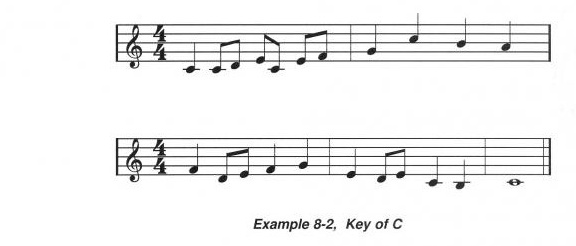
So - here is our "teaching song" in the key of C, once again - and I have
deliberately not written the chords in this time. We're going to go through and try
some chord substitutions - play along with me if you can!
.
.
.
RM218
.
Continuing to look at example 8-2 above, let's work on some more chord
substitutions for this song.
.
.
RM219
.
This time, just listen as I play through some other possible chord substitutions.
.
.
RM220
.
If you haven't printed it out yet, print out a copy of the
Substitution Chart Worksheet
and, as you have time, work on filling out each Substitution Chart
(the format is a little different than the one I talk about in the audio
clip, but it means you have less pages to print).
.
As I've mentioned, when we transpose a song to a new key, not only do the
chords change - the notes do, too!
Here
is a worksheet you can view or print that contains our "Teaching Song" in
all the different keys.
.
When you return to the course index page (click the logo at the top of
this page, you will see that there is a link to a set of Practice exercises
for Lesson 8 (and some other lessons). I encourage you to follow that link
and go through these additional practice exercises to help you learn to
play the major scales on the keyboard.
.
.
Hooray, You Made It Through Lesson 8 !!!
...which means you're well over halfway through the course! Once again - I hope
everything made sense, but if you have questions, click the "Ask Rhonda" button to
send me an email and I'll try to answer your questions as soon as I can!

 Lesson 8: Chord Substitutions